
Verify Email Address Without Sending Email
Introduction: How to Check if an Email Is Real Without Sending One
You’re not alone. Whether you're building a list or verifying contacts, sending test emails can damage your sender reputation.
The good news? You can verify if an email is valid—without sending anything.
This guide will show you how to do it safely, for free, and with zero technical expertise.
Why You Shouldn’t Send Test Emails
Sending test emails might seem like a simple solution—but it can backfire.
Here’s why:
- Damages your sender score: You might get flagged as spam.
- Time-consuming: Sending emails one by one is inefficient.
- Risk of blacklisting: Some addresses are spam traps.
A better alternative? Use tools that verify email status without sending anything.

How These Tools Work (Without Sending Emails)
Email verification tools work quietly in the background—no messages are actually sent.
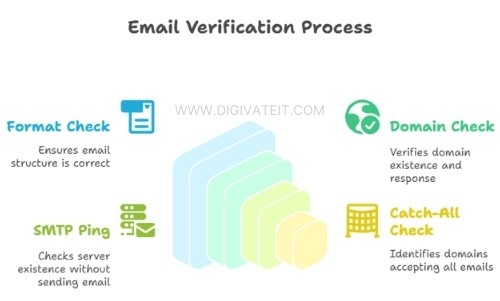
1. Format Check
Does the email follow a proper structure, like [email protected]?
2. Domain Check
Does the domain exist and respond properly?
3. SMTP Ping
The tool “pings” the email server to check if the inbox exists—without sending a message.
4. Catch-All Check
Some domains accept all emails, even fake ones. Good tools will flag this for you.
No real emails are sent during these checks, so your reputation stays safe.
Free Tools to Check Email Validity
Here are some free tools you can use to verify email addresses without sending messages:
| Tool Name | What It Does | Free Tier |
|---|---|---|
| Hunter.io | Checks server status and email formatting | 25 emails/month |
| NeverBounce | Cleans lists and offers real-time API verification | 1,000 emails/month |
| VerifyEmailAddress.org | Quick checks, no sign-up required | Unlimited (but slow) |
| EmailListVerify | Identifies fake and temporary email addresses | 100 emails/day |
| MailboxValidator | Detects spam traps and fake domains | 300 emails/month |
Need more email verifications? Try the Digivate IT Verifier Tool.
3 Easy Steps to Check an Email (Using Hunter.io)
- Visit the Hunter Email Verifier.
- Enter the email address you want to check.
- Click “Verify” to see the results.
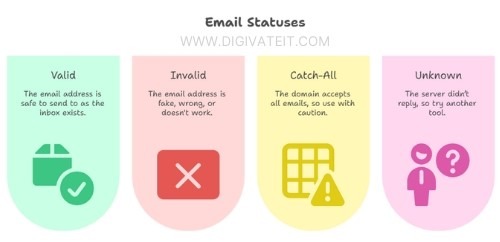
The tool will tell you if the email is valid, invalid, catch-all, or unknown.
What the Results Mean
| Status | What It Means |
|---|---|
| Valid | Safe to send — the inbox exists and is reachable. |
| Invalid | The email is fake, mistyped, or doesn't exist. |
| Catch-All | The domain accepts all emails, even fake ones — use caution. |
| Unknown | The server didn’t respond — consider trying a different tool. |
What About Gmail? Can You Still Check?
Yes, but it's a bit tricky.
Gmail often hides whether an address is real, so some tools may return an “unknown” result.
For better results with Gmail, try these tools:
- MailboxValidator
- EmailListVerify
Tip: Use more than one tool to double-check Gmail addresses.
How to Avoid Fake or Spam Emails
Here’s how to spot suspicious or low-quality emails:
- Look for emails from free or temporary domains like
@mailinator.com - Watch out for odd usernames like
a2j39x@ - Check the domain age using Whois
Avoid emails from senders with:
- New or questionable domains
- No email servers (missing MX records)
- Spammy or random-looking address patterns
Need to Check Many Emails at Once?
You can perform bulk email checks using these tools:
- NeverBounce API — for real-time, live verification
- Hunter API — great for integrating with your CRM
- Digivate IT’s Email Verifier Tool — ideal for checking email lists
Final Tips: Clean Lists = Better Email Results
Verifying emails without sending them is the smart, safe approach.
It protects your sender reputation, saves time, and boosts your overall deliverability.
Need to clean large email lists quickly? Try the Digivate IT Verifier — built for marketers and agencies.
Frequently Asked Questions
1. Can I check emails without sending?
Yes. Use tools that ping the mail server.
2. Are free tools accurate?
Most are 85–90% accurate. Paid tools do better.
3. Is this legal?
Yes, as long as you don’t misuse data.
4. What’s “Catch-All”?
A domain that accepts all emails—even fake ones.
5. What does “Unknown” mean?
The server didn’t reply. Try another checker.
6. Can I check many emails at once?
Yes! Use Digivate IT or other bulk tools.
7. Can I find out who owns an email?
No — you’ll need a different tool for that.
Yes. Use tools that ping the mail server.
Most are 85–90% accurate. Paid tools do better.
Yes, as long as you don’t misuse data.
A domain that accepts all emails—even fake ones.
The server didn’t reply. Try another checker.
Yes! Use Digivate IT or other bulk tools.
No — you’ll need a different tool for that.
Need Help with Software or Automation?
Talk to our technical experts today on WhatsApp for instant guidance.