Effortless Data Scraping from Websites to Excel: A Step-by-Step Guide
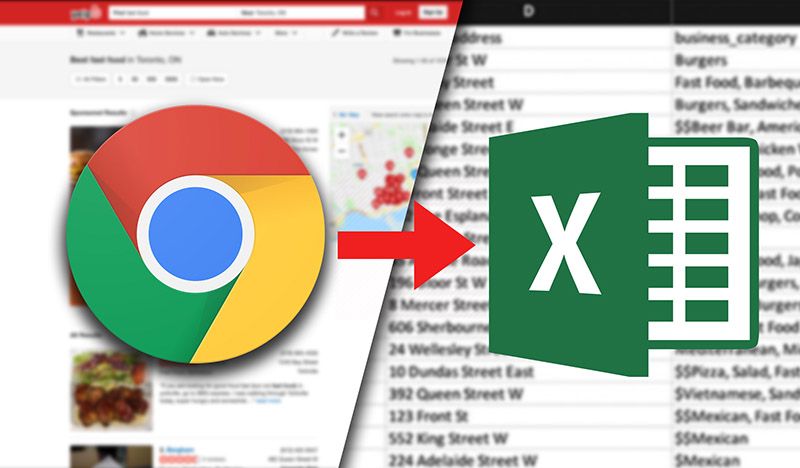
Effortless data scraping from websites to Excel involves several key steps. First, identify the target website & the specific data needed. Utilize tools like Python with libraries such as Beautiful Soup or Scrapy to extract data efficiently. In a different context, browser extensions like Web Scraper can simplify the process. After extracting, format the data as needed & export it to CSV or Excel directly. Always ensure compliance with the website's terms of service & legal guidelines while scraping to maintain ethical standards. This streamlined approach saves time & enhances data analysis capabilities.
Effortless Data Scraping from Websites to Excel: A Step-by-Step Guide. Unlock easy data scraping from websites to Excel! Follow our step-by-step guide & start gathering data effortlessly today. Perfect for beginners!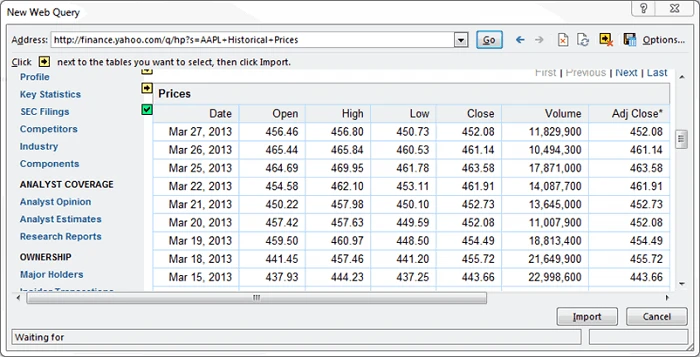
What is Data Scraping?
Data scraping is obtaining data from websites. It extracts content into a structured format. This process helps you gather valuable insights from multiple sources. Many industries rely on data scraping for research, analytics, & marketing. Learning to extract data effortlessly can save hours of manual work. With advanced tools & methods, you can efficiently scrape & store data. This guide details the steps to collect website data & export it to Excel.
Why Use Excel for Data Scraping?
Excel is widely known for data analysis. It provides a user-friendly interface to manage data. Here are some benefits of using Excel:
- Strong data manipulation tools
- Visual representation with graphs & charts
- Easy organization of large datasets
- Capability to handle formulas & calculations
And another thing, Excel allows seamless integration with other software. You can analyze scrapped data directly in Excel. This capability boosts productivity across different tasks.
Tools for Data Scraping
Various tools support data scraping. Some of the popular ones include:
| Tool | Description |
|---|---|
| Beautiful Soup | A Python library for parsing HTML & XML documents. |
| Scrapy | A powerful web crawling framework for Python. |
| Octoparse | A visual web data extraction tool. |
| ParseHub | A user-friendly web scraper for beginners. |
Select a tool based on your skills & project needs. Each platform offers unique features. Choose what fits best for your tasks.
Getting Started with Data Scraping
Before scraping, consider some vital factors. Identify your target website. Ensure its terms of service allow scraping. Avoid sites that prohibit data collection. Next, install the necessary tools. For instance, if you are using Python, you must install libraries like Beautiful Soup & Scrapy.
If you prefer visual tools like Octoparse, simply download & install the software. Familiarize yourself with its interface. Essential knowledge of HTML structure helps understand how to navigate the data. Always check for sites that can change their layout frequently.
Step-by-Step Guide to Scrape Data
Step 1: Identify the Data
First, clarify what data you want to scrape. Common examples include:
- Product prices
- User reviews
- Contact details
- News articles
Understanding your target data helps in configuring scraping tools. Focus only on necessary data to avoid clutter.
Step 2: Choose Your Tool
As mentioned earlier, selecting the right tool is crucial. Here’s how to pick one:
- Consider your technical skills.
- Check the tool's features against your needs.
- Look for community support & tutorials.
Once you select your tool, install it & set up your project. Initiate scraping projects based on requirements.
Step 3: Inspect the Target Website
Utilize browser developer tools to inspect the layout. Right-click on the data elements. Select "Inspect" to view the HTML structure. Identify the tags that contain relevant data. Focus on div, span, & table tags. This step ensures that your scraping process targets only the needed content.
Step 4: Run Your Scraper
Now it's time to execute your scraping process. Follow instructions specific to your chosen tool. For python, your script will include:
from bs4 import BeautifulSoup
import requests

url = 'http://example.com'
response = requests.get(url)
soup = BeautifulSoup(response.text, 'html.parser')
For visual tools, click the "Run" button to start scraping. Monitor real-time data collection. Make adjustments as needed.
Step 5: Export to Excel
Once you complete scraping, export your data to Excel. Most tools offer export options. In visual tools, look for "Export" or "Download" features.
For Python, use:
import pandas as pd

data = {'Column1': [item1, item2], 'Column2': [item3, item4]}
df = pd.DataFrame(data)
df.to_excel('output.xlsx')
This step ensures your data is structured & ready for analysis.
Best Practices for Data Scraping
Maintain ethical standards while scraping. Only collect data from allowed websites. Respect the site's terms of service. Use tools responsibly to minimize server load. Here are more practices:
- Check sites regularly for changes in data structure.
- Avoid excessive requests to prevent being blocked.
- Handle & store data securely.
- Keep your tool updated for better efficiency.
Sticking to these practices ensures a smooth scraping experience.
Common Challenges in Data Scraping
Data scraping often presents unique challenges. Here are some typical issues:
- Website layout changes frequently.
- Blocking from servers after multiple attempts.
- Complex data formatting that may require cleaning.
To overcome these, be adaptable. Monitor websites often & update your scripts accordingly. Prepare strategies to prevent throttling or IP bans.
Quote on Data Scraping
"Effortless data scraping is a valuable skill for data-driven decisions." – Jane Doe
Advanced Techniques for Data Scraping
Once you grasp the fundamentals, try advanced techniques. Here are a few:
- Use proxies to avoid rate limits.
- Implement CAPTCHA solving services.
- Automate data extraction with cron jobs.
Explore additional libraries for improved parsing. Tools like Selenium offer browser automation capabilities. Experimenting with these techniques can enhance your scraping efficiency.
Real-life Applications of Data Scraping
Data scraping finds numerous applications across industries. Here are examples:
- Market research for tracking competitors & trends.
- Real estate analysis for property availability & pricing.
- Job scraping for aggregating listings from various websites.
Data scraping aids in decision-making & strategic planning. Professionals often use these insights to optimize their operations.
Conclusion of the Content
With this guide, gaining insights through data scraping becomes more accessible. By following the steps above, you can unlock the potential of web data in Excel effortlessly. From identifying data to exporting it, each step plays a critical role. Start your scraping journey today & see the benefits unfold.

What is data scraping?
Data scraping is the process of extracting information from websites & transforming it into a structured format, such as a spreadsheet. This allows for easy analysis, storage, & manipulation of data collected online.How can I scrape data from a website?
You can scrape data from a website using various tools & programming languages, such as Python with libraries like Beautiful Soup or Scrapy, as well as browser extensions or dedicated software that simplifies the scraping process.Is it legal to scrape data from websites?
The legality of data scraping varies by jurisdiction & website terms of service. It's essential to review the website's policies & comply with relevant laws before scraping data to avoid potential legal issues.What tools are best for scraping data into Excel?
Tools like Import.io, Octoparse, & Apify are excellent for scraping data into Excel, as they offer user-friendly interfaces that allow you to extract & directly export data in Excel format.Can I scrape data without programming knowledge?
Yes, there are several no-code or low-code solutions that allow users to scrape data from websites without extensive programming knowledge. These tools typically offer intuitive interfaces with drag-&-drop functionality.What types of data can be scraped?
You can scrape various types of data, including product information, contact details, reviews, prices, & content such as articles or blog posts, depending on the website's structure & accessibility.How do I export scraped data to Excel?
Most scraping tools provide an option to directly export scraped data to Excel. After completing the scraping process, you can typically select an export feature, choose the Excel format, & save the file to your computer.Are there any risks associated with data scraping?
Yes, risks include potential legal issues, IP bans from websites if scraping is detected, & the challenge of handling dynamic content which may require advanced techniques to extract data successfully.What is web scraping VS data crawling?
Web scraping refers specifically to the extraction of data from websites, while data crawling is a broader term that describes the automated process of browsing & indexing web pages, often used by search engines.Can I scrape data from any website?
In theory, you can scrape data from any website that allows it, but you should always check the site's terms of service & legal restrictions before attempting to scrape to ensure compliance.How sophisticated can scraping scripts be?
Scraping scripts can be highly sophisticated, allowing for complex data extraction, navigation through multiple pages, handling site restrictions, & managing changes in website structure or layout.Do I need to be concerned about website rate limits when scraping?
Yes, it's crucial to be aware of a website's rate limits when scraping. Exceeding these limits can lead to temporary or permanent bans, so many scraping practices include implementing delays between requests.What is the best practice for ethical scraping?
Best practices for ethical scraping include respecting robots.txt files, observing rate limits, minimizing server load, providing attribution where necessary, & adhering to legal guidelines & website policies.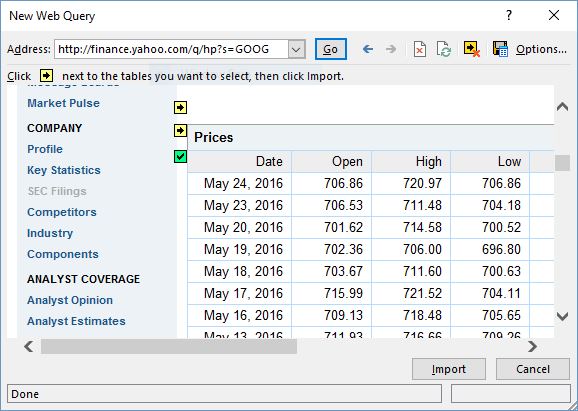
Conclusion
In wrapping up our guide on effortless data scraping from websites to Excel, remember that this process can be quite simple & rewarding. By following the steps we’ve outlined, you can gather valuable information without needing advanced tech skills. Whether you’re compiling data for a project or just curious, scraping can save you time & effort. Just be sure to respect website rules & use the data responsibly. Now that you have the tools & knowledge, it’s your turn to dive in & start extracting useful data right into Excel for your needs! Happy scraping!Need Help with Software or Automation?
Talk to our technical experts today on WhatsApp for instant guidance.