🔥 Top Rated Software
Instant Delivery
Direct Download Link
Ultraviewer Setup
Free Live Support
In Stock & Ready
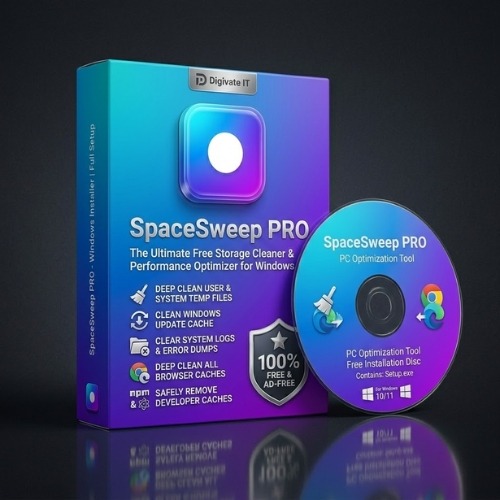
SpaceSweep PRO – Free Storage Cleaner & Performance Optimizer for Windows
৳ 49
৳ 0
Are you constantly getting the dreaded "Low Disk Space" warning on your PC? Is your C: drive bar sitting in the deep red, causing your computer to lag, freeze, or take forever to boot up?
You aren't alone. As we use our PCs, Windows silently piles up gigabytes of temporary logs, browser caches, system updates, and crash dumps. Over time, this digital junk suffocates your hard drive.
Sure, you could try hunting down these files manually—or you can let SpaceSweep PRO do the heavy lifting in seconds.
Developed by Digivate IT, SpaceSweep PRO is a premium, lightweight, and 100% free standalone desktop application designed to reclaim your disk space, clean system clutter, and restore your computer’s peak performance safely.
Instant Automatic Delivery: Get download links + setup guides right after checkout.
Full Unlocked Version: Verified license with no trial limitations.
Free Installation Support: Dedicated guidance via WhatsApp & Ultraviewer if needed.
Buy or Inquire via WhatsApp (Fast Order)
Secure Checkout: bKash / Nagad / Rocket
International Payment? WhatsApp us
Why Your PC is Slow (It’s Not Just Your Hard Drive Size)
When your primary disk (usually the C: drive) has less than 10% free space, Windows struggles to write virtual memory (pagefiles) and execute essential system updates. This causes immediate lagging, application crashes, and noticeable performance drops. Many storage cleaners on the market are bloated, filled with invasive ads, or require expensive monthly subscriptions. SpaceSweep PRO was built differently. It gives you a clean, standalone, ad-free experience with a stunning dark-mode visual interface that puts you in full control of your storage health.Key Features of SpaceSweep PRO
1. One-Click Smart Junk Cleaner
SpaceSweep PRO scans your entire drive in seconds to locate safe-to-delete files. Unlike generic cleanup tools, it categorizes junk cleanly so you know exactly what is being deleted. You can safely clean:- User & System Temp Files: Leftover cache data from installed applications.
- Windows Update Cache: Downloaded files from old updates that are no longer needed.
- System Logs & Error Dumps: Diagnostic records that pile up over time.
- All Browser Caches: Deep cleans offline data, GPU cache, and code cache files from Chrome and Edge profiles to free up hidden space.
- Developer Caches: Safely removes npm package caches and electron-builder downloads.
2. Advanced Large Files Discovery
Sometimes, the biggest space hogs are hidden deep within subdirectories—forgotten 4K video downloads, massive zip archives, or old game installers.- Scan Any Folder: Simply browse or type in any folder path (like your Downloads directory) to scan it.
- Size Filtering: Quickly filter files larger than 50MB, 100MB, 500MB, or 1GB.
- Safe Deletion Actions: Choose to delete files permanently or move them to the Recycle Bin. Restricted system folders are automatically blocked for your PC’s safety.
3. Interactive Storage Dashboard
No more guessing how much space you have. The main dashboard features an interactive circular gauge that displays your primary drive partition size in real-time. Plus, it automatically scans and displays secondary drives (D:, E:, etc.) so you can monitor your entire hardware setup from a single window.4. Instant PC Specs & Health Audit
The built-in System Info module checks your computer's OS specs, CPU architecture, hostname, and C: drive health status. If your storage reaches a critical limit, the system alerts you immediately with actionable instructions.SpaceSweep PRO vs. Other PC Cleaners
| Feature | SpaceSweep PRO | Traditional Bloatware Cleaners |
| Price | 100% Free (Sponsored by Digivate IT) | Expensive Subscriptions / Paywalls |
| Ads & Popups | Absolutely None | Constant Upsells & Annoying Ads |
| User Interface | Premium Glassmorphism Dark Mode | Outdated, Cluttered Layouts |
| Installation | Standalone Desktop App (NSIS Setup) | Installs unwanted bundled browsers |
| Security | Safe Path Filters & Recycle Options | Deletes registry keys, causing system crashes |
How to Use SpaceSweep PRO in 3 Simple Steps
Using SpaceSweep PRO requires no technical knowledge. Here is how to clean your PC in under a minute:- Run a Quick Clean Scan: Open SpaceSweep PRO, navigate to the Quick Clean tab, and click Analyze Junk. The program will scan your directories and calculate exactly how much space you can reclaim.
- Start Cleanup: Check or uncheck the categories you want to clean, then click Start Cleanup. Watch the files flush in real-time as gigabytes of storage are instantly reclaimed.
- Find Large Files: Head over to the Large Files Finder, select your Downloads directory or a custom path, choose a threshold (e.g., > 100MB), and hit Find Files to clear out forgotten space-hogging archives.
Frequently Asked Questions (FAQs)
Is SpaceSweep PRO safe to use?
Yes, absolutely. SpaceSweep PRO is built with strict safety path filters (isSafePath rules) that prevent users from scanning or deleting files inside critical Windows system folders (like C:\Windows or Program Files). It only targets temporary application cache folders and files that are 100% safe to remove.
Will SpaceSweep PRO delete my personal files?
No. SpaceSweep PRO will never touch your documents, pictures, music, desktop icons, or installed programs. The Quick Clean targets temporary cache folders, while the Large Files Finder only displays lists of files and requires you to manually click "Delete" to remove them.Do I need Node.js installed to run the final app?
No. The compiled setup installer (SpaceSweep_Setup.exe) packages everything into a standalone desktop application. Once installed, it runs as a native application without requiring any external runtimes or frameworks.
Is this software really free?
Yes. SpaceSweep PRO is sponsored and distributed 100% free by Digivate IT to help computer operators optimize their digital workspaces without dealing with paywalls or subscription licenses.Reclaim Your Storage Space Today
Don't let a sluggish hard drive slow down your productivity. Get your computer running at its absolute best with a clean, secure, and modern optimization tool.Related Software & Tools
Recommended tools to supercharge your business growth